

Screenshots piling up on your Desktop?
Screenshot organizer for your Mac.
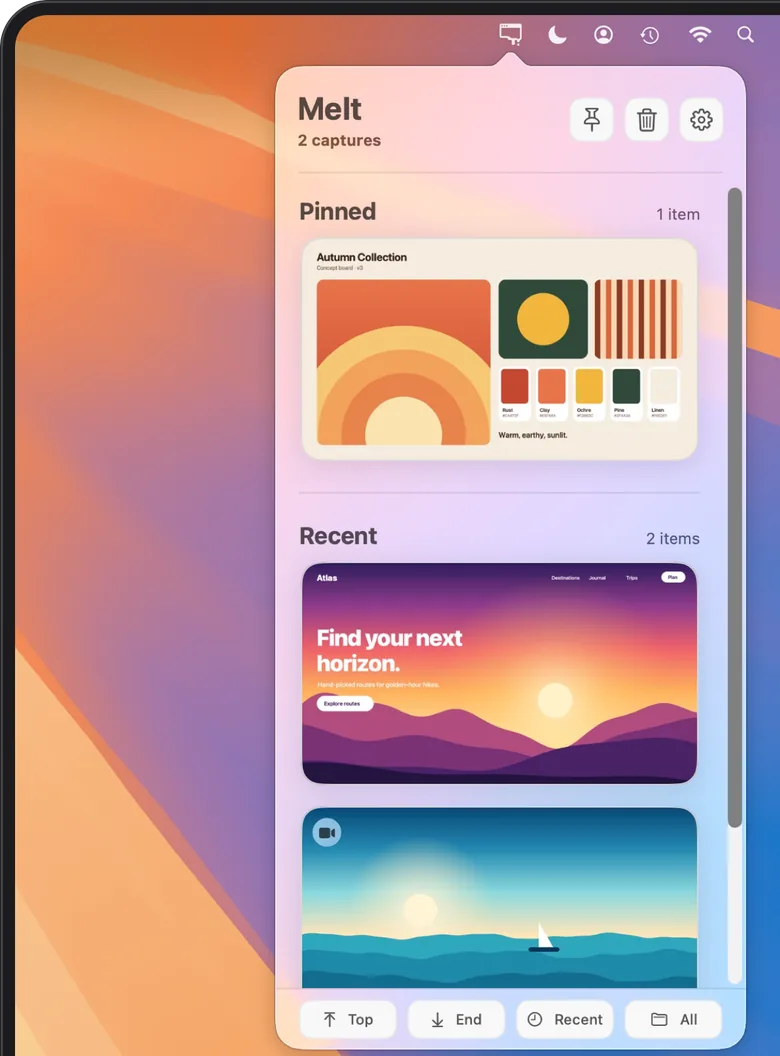
Melt keeps your latest screenshots and screen recordings one click away in the menu bar. Copy images, drag files into your work, and turn on cleanup to move old, unpinned captures to the Trash.

 Pay once. Use forever.
- macOS 15 or later
- No subscription
- 100% local
-
Instant access
Recent captures one click away in the menu bar.
-
Copy & drag anywhere
Paste or drop the original into any app.
-
Automatic cleanup
Old unpinned captures move to the Trash.
Watch
Access faster. Clean up automatically.
From the menu bar to any app, then quietly to the Trash. A 25-second tour.
Copy & drag
Copy. Drag. Done.
Use recent screenshots instantly, without digging through folders.
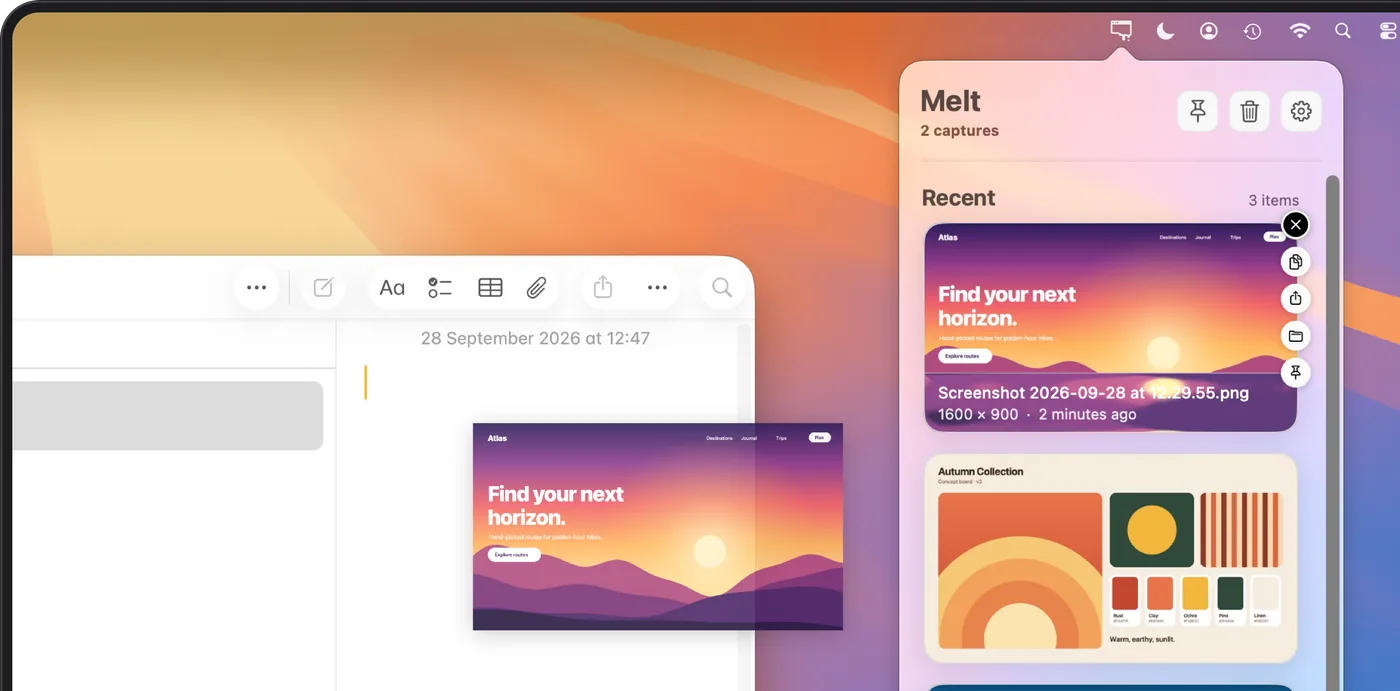
Copy any screenshot to the clipboard with one click or ⌘C.
Drag the original file into Mail, Messages, Notes, chats, docs, tickets or Finder.
Share, open, or reveal in Finder right from the card.
New saved captures appear while Melt is running. Pin the tray above your windows while you work.
Automatic cleanup
Screenshot clutter cleans itself.
When you enable cleanup, old unpinned captures move to Trash. Pin anything you want to keep.
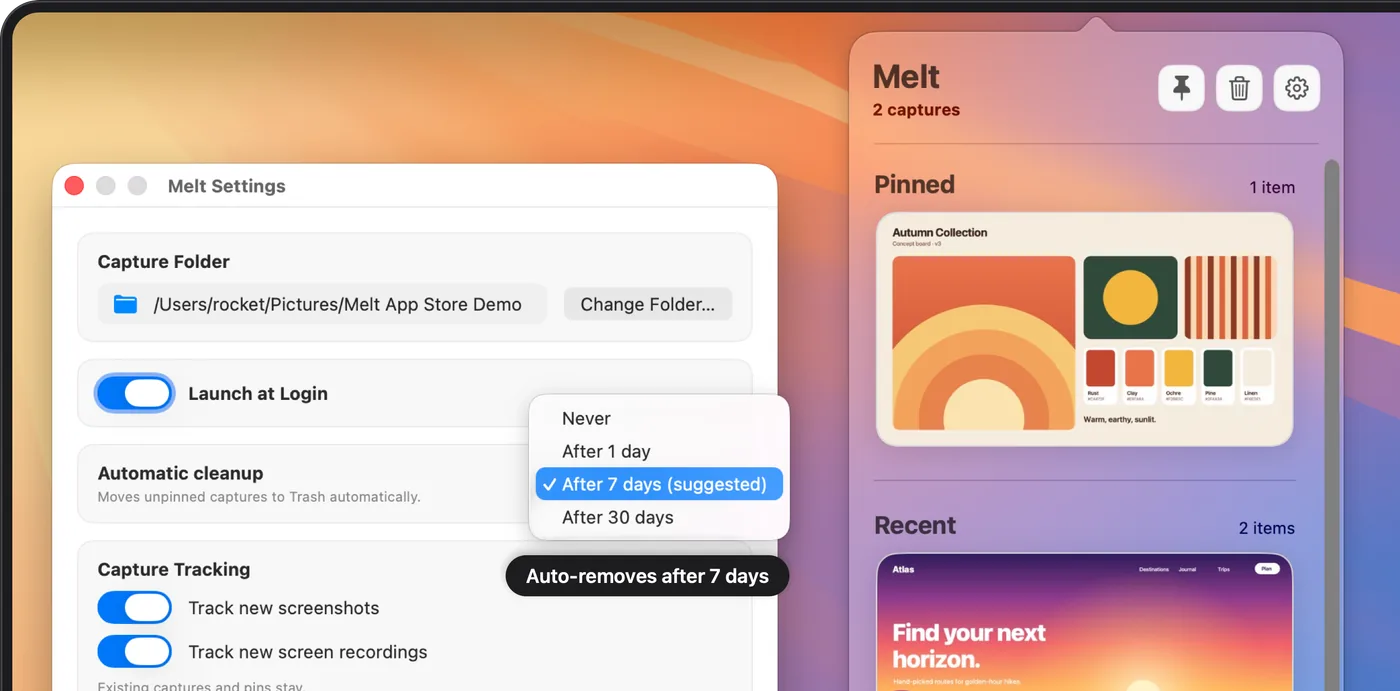
Old, unpinned captures move to the system Trash. You can recover them until you empty the Trash.
Clear every unpinned capture at once with a single confirmed click.
Screen recordings are included too, often the biggest files on your Desktop.
Keyboard
Hands stay on the keys.
Open the tray and work through your captures without reaching for the mouse.
- ↑↓ Move between captures
- ↩ Open the original
- ⌘C Copy image
- ⌘P Pin or unpin
- ⌘F Show in Finder
- ⌫ Move to Trash
Your files stay yours
No copies. No cloud. No surprises.
Melt works with your original files, right where macOS saves them.
-
Originals only
No copies and no hidden library. Your file stays the single source of truth.
-
100% local
No account, no tracking, no data collection.
-
Trash, never erase
Cleanup uses the system Trash, and it stays off until you turn it on.
-
Any folder
Works with your Desktop or any folder you save screenshots to.
-
Made for the Mac
Native design with light and dark mode, and Liquid Glass on macOS Tahoe.
-
Quietly there
Enable Launch at Login to keep Melt ready in your menu bar.
How it works
Set up in under a minute.
-
Choose your folder
Pick the folder where your Mac saves screenshots. It is the Desktop by default.
-
Capture as usual
Take screenshots and recordings with ⇧⌘3, ⇧⌘4 or ⇧⌘5.
-
Click Melt
Your captures wait in the menu bar whenever you need them.
Melt starts fresh: it shows new captures saved while it is running and never touches files that were already in the folder.
FAQ
Questions and answers
Does Melt delete my files?
Never permanently. Automatic cleanup is off until you turn it on. Then it moves only old, unpinned captures to the system Trash, where they stay until you empty it.
What about the screenshots already on my Desktop?
Melt leaves them alone. It shows new captures saved while Melt is running and never touches existing folder files. Captures made while the app was closed are not imported later.
My screenshots are saved somewhere else. Does Melt work?
Yes. Choose the folder that matches Screenshot › Options › Save To. Melt works with the Desktop or any local folder.
Are screen recordings supported?
Yes. Completed recordings from ⇧⌘5 appear next to your screenshots, and cleanup can include them too.
Is it a subscription?
No. Pay once and use it forever. No subscription, no in-app purchases, no account.
Does Melt upload my captures?
No. Everything stays on your Mac. There is no account, no cloud and no tracking.
Which Macs are supported?
Any Mac running macOS 15 Sequoia or later. On macOS Tahoe, Melt uses Liquid Glass.
Mac screenshot guides
Find, use and tidy your captures.
Practical answers for your screenshot folder, cleanup settings and screen recordings.
Where Are Screenshots Saved on Mac? Find & Change the Folder
Find a missing screenshot, choose a dedicated folder, and connect that folder to Melt.
Read the guideAutomatically Clean Up Screenshots on Mac with Melt
Set an age limit for temporary captures, protect important ones, and understand what cleanup touches.
Read the guideManage Recent Screen Recordings on Mac from the Menu Bar
Keep completed recordings close while you share them, then decide which originals to retain.
Read the guideHow to Take a Screenshot on Mac: Every Shortcut and Option
Every built-in way to capture your screen, from the three main shortcuts to windows, timers and the Clipboard.
Read the guideHow to Screen Record on Mac, With or Without Audio
Record the whole screen, a window or a selection, choose a microphone, and find the finished file.
Read the guideHow to Stop Screenshots Cluttering Your Mac Desktop
Move new captures off the Desktop, tidy the backlog in Finder, and decide how long temporary screenshots should stay.
Read the guide
Access faster. Clean up automatically.
US$4.99 in the US store. Pay once. No subscription, no app account, no cloud. Apple shows your local price.
macOS 15 or later